
Car Rental Software
Launch branded car rental management software that lets customers search available vehicles, compare rental options, select pickup and return locations, complete KYC, make payments, confirm reservations, manage bookings, and access wallet and profile information from one mobile experience.
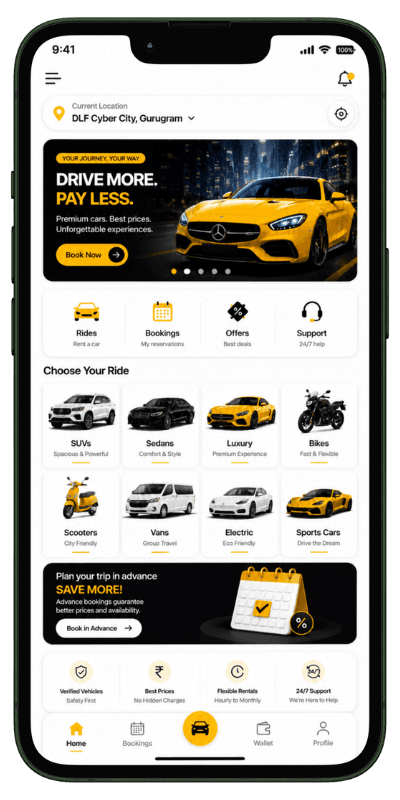
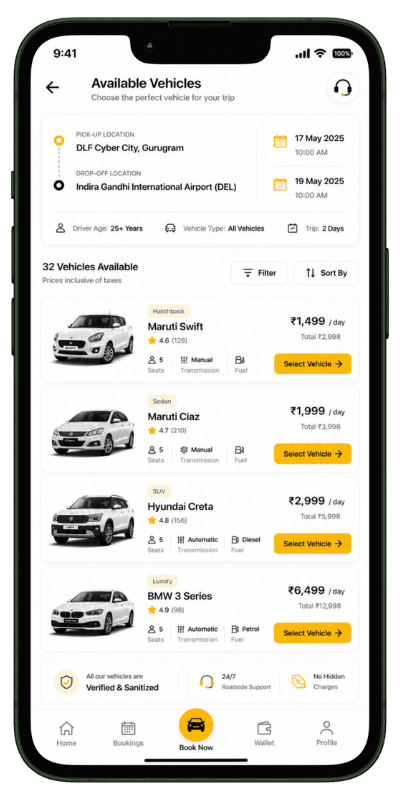
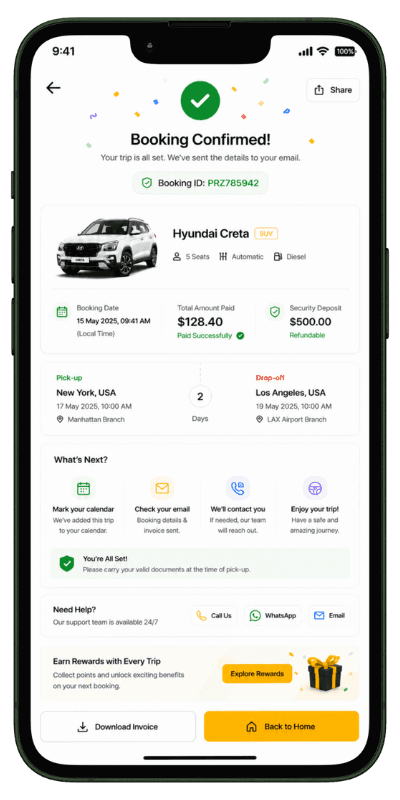
Vehicle Search
Customer KYC
Online Payment
Search → Select → Verify → Pay → Confirm


What Is Car Rental Management Software?
Car rental management software is a digital vehicle booking platform that helps rental companies present available cars, collect customer details, receive reservations, complete KYC, process payments, and provide clear booking information through a branded customer application.
The same platform can work as vehicle rental software or car hire software for businesses offering cars, SUVs, luxury vehicles, vans, bikes, trucks, and other rental categories. Customers receive a structured experience from vehicle search and KYC to payment, confirmation, wallet, and booking history.
How Our Car Rental Software Booking Journey Works
A complete customer journey from vehicle search and selection to KYC, payment, booking confirmation, and reservation history.
Customer Searches for a Rental Vehicle
The customer selects pickup and return locations, rental dates, and preferred vehicle details to view available options.
Customer Selects the Right Vehicle
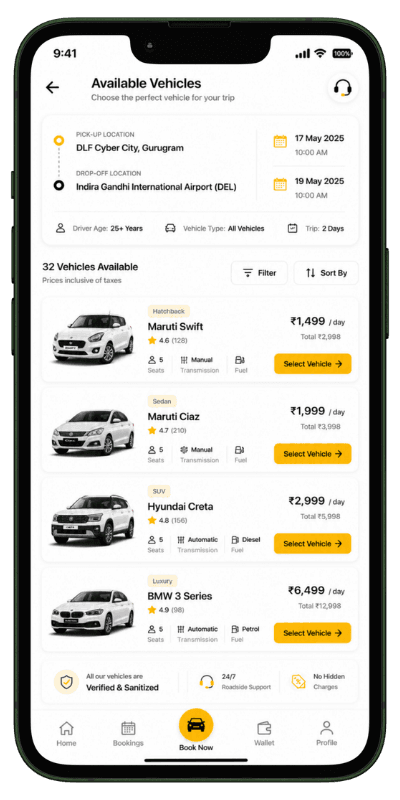
The customer compares available cars, pricing, specifications, transmission, fuel type, seats, and rental features.
Pickup and Return Details Are Confirmed
The customer chooses the required pickup and return locations and verifies the complete rental schedule.
Customer Completes Rental KYC
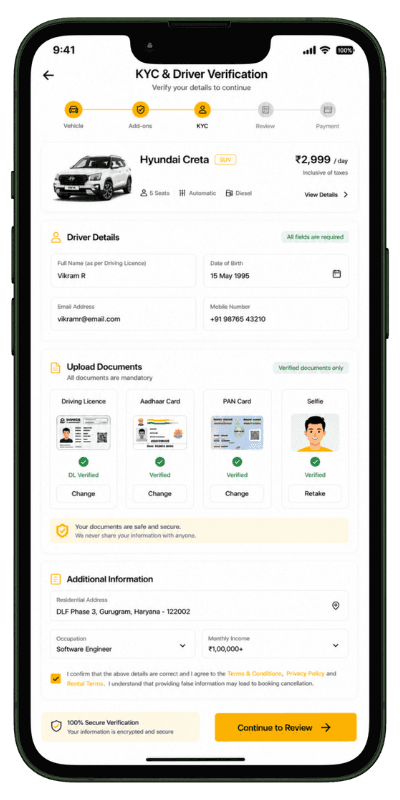
Identity and driving licence details are submitted according to the rental company's verification requirements.
Booking Payment Is Completed
The customer reviews the rental amount, deposit, taxes, and payment summary before completing the reservation.
Rental Booking Is Confirmed
The confirmed reservation appears in My Bookings with vehicle, payment, pickup, return, and booking information.
Search and Book with a Branded Car Rental App
Give customers a clear mobile experience for finding vehicles, completing KYC, making payments, and managing reservations.
Guide Customers from Onboarding to Vehicle Search
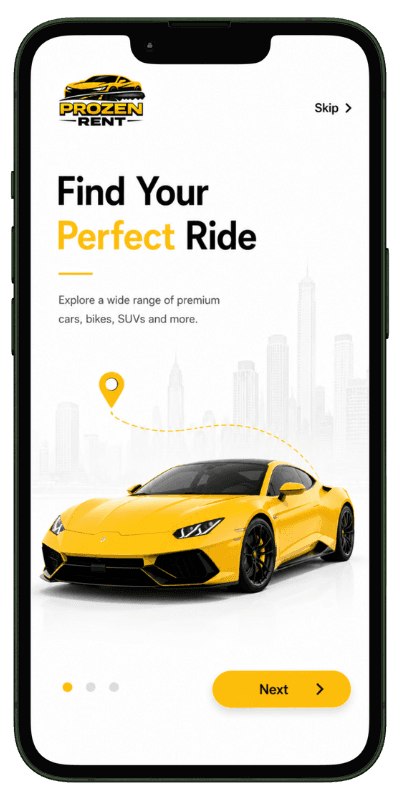
Customers can complete onboarding, register, log in securely, open the rental home screen, and begin searching for available vehicles through a guided experience.
- Introduce the Car Rental Service
- Explain the Main Booking Benefits
- Guide New Customers into the App
Compare Vehicles, Locations and Rental Details
Customers can choose pickup and return locations, search available vehicles, apply filters, review vehicle specifications, and continue to the rental booking process.
- Enter Rental Dates and Locations
- Start an Availability Search
- Find Vehicles Matching the Journey
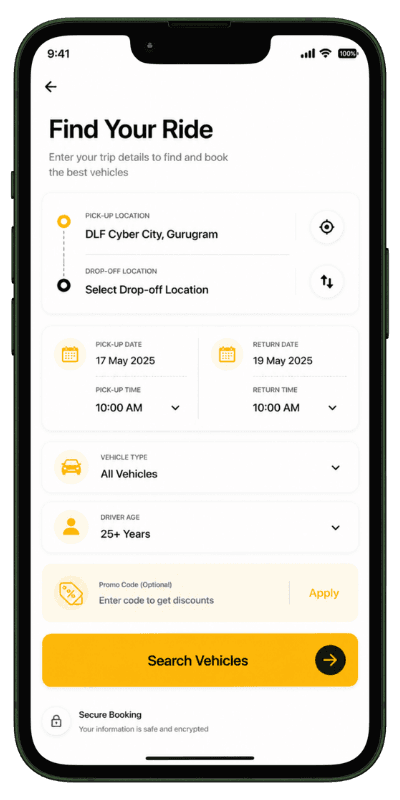
Vehicle Search
Let customers search available rental vehicles using pickup location, return location, and rental dates.
Multiple Vehicle Categories
Display economy cars, sedans, SUVs, luxury vehicles, vans, and other configurable rental categories.
Smart Vehicle Filters
Customers can refine vehicles using price, category, seats, transmission, fuel type, and other specifications.
Pickup and Return Locations
Support different pickup and return points for local, airport, city, and multi-branch rental operations.
Customer KYC
Collect identity, driving licence, and other required documents before the rental booking is finalized.
Booking Updates
Keep customers informed about confirmation, payment, pickup reminders, return reminders, and booking changes.
Wallet and Payments
Support booking payments, wallet balance, security deposits, and clear transaction history.
My Bookings
Customers can access upcoming, active, completed, and cancelled rental reservations from one place.
Profile Management
Users can update personal information, account details, KYC information, and rental preferences.
Complete Reservations with a Guided Booking Flow
Customers can complete KYC, review rental charges, make payments, receive confirmation, manage bookings, use wallet features, and update their profile.
From Customer KYC to Booking Confirmation
The car rental application provides a structured flow for identity verification, driving licence submission, payment, booking confirmation, and complete reservation details.
- Submit Identity Information
- Provide Driving Licence Details
- Complete the Rental Verification Step
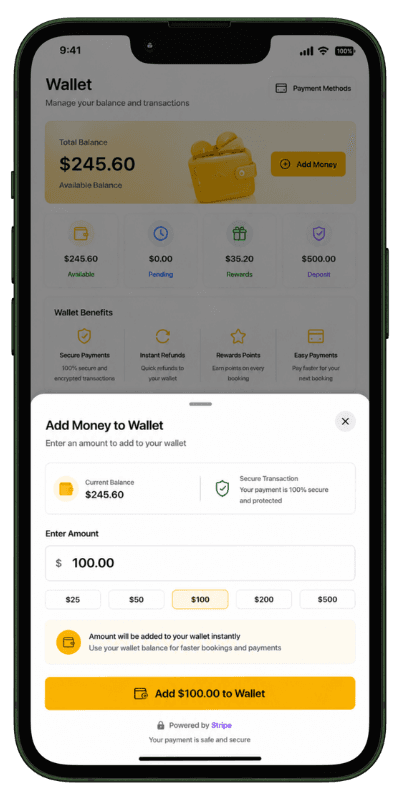
Manage Rental Bookings, Wallet and Customer Profile
Customers can review reservations, manage wallet funds, add money, update profile information, revisit vehicle details, and securely access their account.
- Add Funds to the Wallet
- Prepare Balance for New Bookings
- Maintain a Clear Payment Record
Rental Date Selection
Customers can select pickup and return dates based on vehicle availability and business rules.
KYC Document Submission
Required identity and driving documents can be submitted during the reservation process.
Customer Home Dashboard
Customers can start a new search, view rental categories, and access current booking information.
Complete Booking Details
Each reservation shows vehicle, rental period, pickup location, return location, payment, and status details.
Transparent Price Summary
Customers can review rental charges, taxes, deposit, discounts, and the final payable amount.
Booking Confirmation
Customers receive a clear confirmation screen after successful reservation and payment.
Customer Wallet
Customers can view wallet balance, add funds, and review payment transactions based on the workflow.
Reservation History
Previous and current vehicle bookings can be reviewed with complete rental information.
Show Clear Rental Pricing throughout the Vehicle Booking Flow
Customers can review the selected vehicle, rental duration, pickup and return information, taxes, security deposit, and final amount before payment. A clear summary improves transparency and helps customers complete the reservation confidently.
Features Included in Our Car Rental Management Software
Essential vehicle search, booking, KYC, payment, wallet, branding, and deployment capabilities for a modern rental business.
White-Label Branding
Launch the car rental application using your own business name, logo, colours, and brand identity.
Customer Rental Application
Provide a dedicated mobile experience for vehicle search, reservations, payments, wallet, and bookings.
Flexible Rental Setup
Configure vehicle categories, locations, pricing, rental duration, deposits, and business-specific rules.
Flexible Rental Pricing
Support hourly, daily, weekly, monthly, seasonal, and vehicle-specific pricing models.
Multiple Rental Locations
Allow customers to choose available pickup and return locations across branches, cities, or airports.
Structured Booking Workflow
Guide every customer through search, selection, KYC, payment, confirmation, and booking management.
Secure Authentication
Support protected login, registration, profile management, and customer account access.
Reservation Notifications
Send important confirmation, payment, pickup, return, cancellation, and booking updates.
Digital Payment Ready
Integrate suitable payment methods and maintain clear booking and wallet transaction records.
Global Market Support
Customize the platform for new countries, locations, languages, currencies, and rental models.
Custom Feature Development
Extend the car hire software with additional features and third-party integrations.
Deployment Support
Receive assistance for platform configuration, server deployment, and application publishing.
Why Choose Us for Car Rental Software?
Build a vehicle rental platform around your business model, vehicle categories, target market, brand, and growth plans.
Rental-Focused Customer Journey
The application follows a real vehicle search, KYC, payment, confirmation, and booking workflow.
Complete Brand Customization
Your visual identity, vehicle content, pricing, locations, and rental policies can be customized.
Mobile-First Experience
Customer screens are designed for simple everyday use on Android and iOS devices.
Scalable Architecture
The platform can support more vehicles, locations, customers, languages, and future integrations.
Launch Assistance
We support platform setup, customization, deployment, and application publishing requirements.
Technical Support
Get ongoing support for platform stability, updates, integrations, and business-specific improvements.
Frequently Asked Questions about Vehicle Rental Software
Clear answers about vehicle search, KYC, reservations, payments, wallet, branding, and platform customization.